o3seespy.beam_integration
- class o3seespy.command.beam_integration.BeamIntegrationBase[source]
Bases:
OpenSeesObject- op_base_type = 'beamIntegration'
- class o3seespy.command.beam_integration.CompositeSimpson(osi, sec, big_n)[source]
Bases:
BeamIntegrationBaseThe CompositeSimpson BeamIntegration Class
Create a CompositeSimpson beamIntegration object.Arguments and examples see Lobatto-BeamIntegration.
Initial method for CompositeSimpson
- Parameters
osi (o3seespy.OpenSeesInstance) –
sec (obj) –
big_n (None) –
Examples
>>> import o3seespy as o3
>>> osi = o3.OpenSeesInstance(ndm=2)
>>> sec = o3.section.Elastic2D(osi, 10.0, 1.0, 1.0)
>>> o3.beam_integration.CompositeSimpson(osi, sec=sec, big_n=1)
- op_type = 'CompositeSimpson'
- class o3seespy.command.beam_integration.FixedLocation(osi, big_n, secs, locs)[source]
Bases:
BeamIntegrationBaseThe FixedLocation BeamIntegration Class
Create a FixedLocation beamIntegration object.This option allows user-specified locations of the integration points. The associated integrationweights are computed by the method of undetermined coefficients (Vandermondesystem)

Note that NewtonCotes-BeamIntegration integration is recovered when the integration point locations are equally spaced.
Initial method for FixedLocation
- Parameters
osi (o3seespy.OpenSeesInstance) –
big_n (int) – Number of integration points along the element.
secs (list) – A list previous-defined section objects.
locs (list) – Locations of integration points along the element.
Examples
>>> import o3seespy as o3
>>> osi = o3.OpenSeesInstance(ndm=2)
>>> secs = [o3.section.Elastic2D(osi, e_mod=1.0, area=1.0, iz=1.0),
>>>         o3.section.Elastic2D(osi, e_mod=1.0, area=1.0, iz=1.0)]
>>> o3.beam_integration.FixedLocation(osi, big_n=2, secs=secs, locs=[0.2, 0.9])
- op_type = 'FixedLocation'
- class o3seespy.command.beam_integration.HingeEndpoint(osi, sec_i, lp_i, sec_j, lp_j, sec_e)[source]
Bases:
BeamIntegrationBaseThe HingeEndpoint BeamIntegration Class
Create a HingeEndpoint beamIntegration object.Endpoint integration over each hinge region moves the integration points to the element ends;however, there is a large integration error for linear curvature distributions along the element.
Initial method for HingeEndpoint
- Parameters
osi (o3seespy.OpenSeesInstance) –
sec_i (obj) – A previous-defined section object for hinge at i.
lp_i (float) – The plastic hinge length at i.
sec_j (obj) – A previous-defined section object for hinge at j.
lp_j (float) – The plastic hinge length at j.
sec_e (obj) – A previous-defined section object for the element interior.
Examples
>>> import o3seespy as o3
>>> osi = o3.OpenSeesInstance(ndm=2)
>>> sec_i = o3.section.Elastic2D(osi, 10.0, 1.0, 1.0)
>>> sec_j = o3.section.Elastic2D(osi, 10.0, 1.0, 1.0)
>>> sec_e = o3.section.Elastic2D(osi, 10.0, 1.0, 1.0)
>>> o3.beam_integration.HingeEndpoint(osi, sec_i=sec_i, lp_i=1.0, sec_j=sec_j, lp_j=1.0, sec_e=sec_e)
- op_type = 'HingeEndpoint'
- class o3seespy.command.beam_integration.HingeMidpoint(osi, sec_i, lp_i, sec_j, lp_j, sec_e)[source]
Bases:
BeamIntegrationBaseThe HingeMidpoint BeamIntegration Class
Create a HingeMidpoint beamIntegration object.Midpoint integration over each hinge region is the most accurate one-point integration rule;however, it does not place integration points at the element ends and there is a small integrationerror for linear curvature distributions along the element.
Initial method for HingeMidpoint
- Parameters
osi (o3seespy.OpenSeesInstance) –
sec_i (obj) – A previous-defined section object for hinge at i.
lp_i (float) – The plastic hinge length at i.
sec_j (obj) – A previous-defined section object for hinge at j.
lp_j (float) – The plastic hinge length at j.
sec_e (obj) – A previous-defined section object for the element interior.
Examples
>>> import o3seespy as o3
>>> osi = o3.OpenSeesInstance(ndm=2)
>>> sec_i = o3.section.Elastic2D(osi, 10.0, 1.0, 1.0)
>>> sec_j = o3.section.Elastic2D(osi, 10.0, 1.0, 1.0)
>>> sec_e = o3.section.Elastic2D(osi, 10.0, 1.0, 1.0)
>>> o3.beam_integration.HingeMidpoint(osi, sec_i=sec_i, lp_i=1.0, sec_j=sec_j, lp_j=1.0, sec_e=sec_e)
- op_type = 'HingeMidpoint'
- class o3seespy.command.beam_integration.HingeRadau(osi, sec_i, lp_i, sec_j, lp_j, sec_e)[source]
Bases:
BeamIntegrationBaseThe HingeRadau BeamIntegration Class
Create a HingeRadau beamIntegration object.Modified two-point Gauss-Radau integration over each hinge region places an integration point atthe element ends and at 8/3 the hinge length inside the element. This approach representslinear curvature distributions exactly and the characteristic length for softening plastic hinges is equal to the assumed palstic hinge length.Arguments and examples see HingeMidPoint-BeamIntegration.
Initial method for HingeRadau
- Parameters
osi (o3seespy.OpenSeesInstance) –
sec_i (obj) –
lp_i (None) –
sec_j (obj) –
lp_j (None) –
sec_e (obj) –
Examples
>>> import o3seespy as o3
>>> osi = o3.OpenSeesInstance(ndm=2)
>>> sec_i = o3.section.Elastic2D(osi, 10.0, 1.0, 1.0)
>>> sec_j = o3.section.Elastic2D(osi, 10.0, 1.0, 1.0)
>>> sec_e = o3.section.Elastic2D(osi, 10.0, 1.0, 1.0)
>>> o3.beam_integration.HingeRadau(osi, sec_i=sec_i, lp_i=1.0, sec_j=sec_j, lp_j=1.0, sec_e=sec_e)
- op_type = 'HingeRadau'
- class o3seespy.command.beam_integration.HingeRadauTwo(osi, sec_i, lp_i, sec_j, lp_j, sec_e)[source]
Bases:
BeamIntegrationBaseThe HingeRadauTwo BeamIntegration Class
Create a HingeRadauTwo beamIntegration object.Two-point Gauss-Radau integration over each hinge region places an integrationpoint at the element ends and at 2/3 the hinge length inside the element. This approachrepresents linear curvature distributions exactly; however, the characteristic length for softeningplastic hinges is not equal to the assumed plastic hinge length (equals 1/4 of the plastic hinge length).Arguments and examples see HingeMidPoint-BeamIntegration.
Initial method for HingeRadauTwo
- Parameters
osi (o3seespy.OpenSeesInstance) –
sec_i (obj) –
lp_i (None) –
sec_j (obj) –
lp_j (None) –
sec_e (obj) –
Examples
>>> import o3seespy as o3
>>> osi = o3.OpenSeesInstance(ndm=2)
>>> sec_i = o3.section.Elastic2D(osi, 10.0, 1.0, 1.0)
>>> sec_j = o3.section.Elastic2D(osi, 10.0, 1.0, 1.0)
>>> sec_e = o3.section.Elastic2D(osi, 10.0, 1.0, 1.0)
>>> o3.beam_integration.HingeRadauTwo(osi, sec_i=sec_i, lp_i=1.0, sec_j=sec_j, lp_j=1.0, sec_e=sec_e)
- op_type = 'HingeRadauTwo'
- class o3seespy.command.beam_integration.Legendre(osi, sec, big_n)[source]
Bases:
BeamIntegrationBaseThe Legendre BeamIntegration Class
Create a Gauss-Legendre beamIntegration object.Gauss-Legendre integration is more accurate than Gauss-Lobatto; however, it is not commonin force-based elements because there are no integration points at the element ends.of each integration point are tabulated in references on numerical analysis.The force deformation response at each integration point is defined by the section.The order of accuracy for Gauss-Legendre integration is 2N-1.Arguments and examples see Lobatto-BeamIntegration.
Initial method for Legendre
- Parameters
osi (o3seespy.OpenSeesInstance) –
sec (obj) –
big_n (None) –
Examples
>>> import o3seespy as o3
>>> osi = o3.OpenSeesInstance(ndm=2)
>>> sec = o3.section.Elastic2D(osi, 10.0, 1.0, 1.0)
>>> o3.beam_integration.Legendre(osi, sec=sec, big_n=1)
- op_type = 'Legendre'
- class o3seespy.command.beam_integration.Lobatto(osi, sec, big_n)[source]
Bases:
BeamIntegrationBaseThe Lobatto BeamIntegration Class
Create a Gauss-Lobatto beamIntegration object.Gauss-Lobatto integration is the most common approach for evaluating the response of`forceBeamColumn-Element` (`Neuenhofer and Filippou 1997`_) because it places an integration point at each end of the element, where bending moments are largest in the absence of interior element loads.
Initial method for Lobatto
- Parameters
osi (o3seespy.OpenSeesInstance) –
sec (obj) – A previous-defined section object.
big_n (int) – Number of integration points along the element.
Examples
>>> import o3seespy as o3
>>> osi = o3.OpenSeesInstance(ndm=2)
>>> sec = o3.section.Elastic2D(osi, 10.0, 1.0, 1.0)
>>> o3.beam_integration.Lobatto(osi, sec=sec, big_n=1)
- op_type = 'Lobatto'
- class o3seespy.command.beam_integration.LowOrder(osi, big_n, secs, locs, wts)[source]
Bases:
BeamIntegrationBaseThe LowOrder BeamIntegration Class
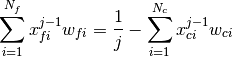
Create a LowOrder beamIntegration object.This option is a generalization of the FixedLocation-BeamIntegration and UserDefined-BeamIntegration integration approaches and is useful for moving load analysis (`Kidarsa, Scott and Higgins 2008`_). The locations of the integration points are user defined,while a selected number of weights are specified and the remaining weights arecomputed by the method of undetermined coefficients.
Initial method for LowOrder
- Parameters
osi (o3seespy.OpenSeesInstance) –
big_n (int) – Number of integration points along the element.
secs (list) – A list previous-defined section objects.
locs (list) – Locations of integration points along the element.
wts (list) – Weights of integration points.
Examples
>>> import o3seespy as o3
>>> osi = o3.OpenSeesInstance(ndm=2)
>>> secs = [o3.section.Elastic2D(osi, e_mod=1.0, area=1.0, iz=1.0),
>>>         o3.section.Elastic2D(osi, e_mod=1.0, area=1.0, iz=1.0)]
>>> o3.beam_integration.LowOrder(osi, big_n=2, secs=secs, locs=[0.2, 0.9], wts=[0.5, 0.5])
- op_type = 'LowOrder'
- class o3seespy.command.beam_integration.MidDistance(osi, big_n, secs, locs)[source]
Bases:
BeamIntegrationBaseThe MidDistance BeamIntegration Class
Create a MidDistance beamIntegration object.This option allows user-specified locations of the integration points. The associated integration weights are determined from the midpoints between adjacent integration point locations.:math:w_i=(x_{i+1}-x_{i-1})/2 for
 ,
,  , and
, and
 .
.Initial method for MidDistance
- Parameters
osi (o3seespy.OpenSeesInstance) –
big_n (int) – Number of integration points along the element.
secs (list) – A list previous-defined section objects.
locs (list) – Locations of integration points along the element.
Examples
>>> import o3seespy as o3
>>> osi = o3.OpenSeesInstance(ndm=2)
>>> secs = [o3.section.Elastic2D(osi, e_mod=1.0, area=1.0, iz=1.0),
>>>         o3.section.Elastic2D(osi, e_mod=1.0, area=1.0, iz=1.0)]
>>> o3.beam_integration.MidDistance(osi, big_n=2, secs=secs, locs=[0.2, 0.9])
- op_type = 'MidDistance'
- class o3seespy.command.beam_integration.NewtonCotes(osi, sec, big_n)[source]
Bases:
BeamIntegrationBaseThe NewtonCotes BeamIntegration Class
Create a Newton-Cotes beamIntegration object.Newton-Cotes places integration points uniformly along the element, including a point ateach end of the element.spaced integration points are tabulated in references on numerical analysis. The force deformationresponse at each integration point is defined by the section.The order of accuracy for Gauss-Radau integration is N-1.Arguments and examples see Lobatto-BeamIntegration.
Initial method for NewtonCotes
- Parameters
osi (o3seespy.OpenSeesInstance) –
sec (obj) –
big_n (None) –
Examples
>>> import o3seespy as o3
>>> osi = o3.OpenSeesInstance(ndm=2)
>>> sec = o3.section.Elastic2D(osi, 10.0, 1.0, 1.0)
>>> o3.beam_integration.NewtonCotes(osi, sec=sec, big_n=1)
- op_type = 'NewtonCotes'
- class o3seespy.command.beam_integration.Radau(osi, sec, big_n)[source]
Bases:
BeamIntegrationBaseThe Radau BeamIntegration Class
Create a Gauss-Radau beamIntegration object.Gauss-Radau integration is not common in force-based elements because it places an integration point at only one end of the element; however, it forms the basis for optimal plastichinge integration methods.numerical analysis. The force-deformation response at each integration point is definedby the section. The order of accuracy for Gauss-Radau integration is 2N-2.Arguments and examples see Lobatto-BeamIntegration.
Initial method for Radau
- Parameters
osi (o3seespy.OpenSeesInstance) –
sec (obj) –
big_n (None) –
Examples
>>> import o3seespy as o3
>>> osi = o3.OpenSeesInstance(ndm=2)
>>> sec = o3.section.Elastic2D(osi, 10.0, 1.0, 1.0)
>>> o3.beam_integration.Radau(osi, sec=sec, big_n=1)
- op_type = 'Radau'
- class o3seespy.command.beam_integration.Trapezoidal(osi, sec, big_n)[source]
Bases:
BeamIntegrationBaseThe Trapezoidal BeamIntegration Class
Create a Trapezoidal beamIntegration object.Arguments and examples see Lobatto-BeamIntegration.
Initial method for Trapezoidal
- Parameters
osi (o3seespy.OpenSeesInstance) –
sec (obj) –
big_n (int) –
Examples
>>> import o3seespy as o3
>>> osi = o3.OpenSeesInstance(ndm=2)
>>> sec = o3.section.Elastic2D(osi, 10.0, 1.0, 1.0)
>>> o3.beam_integration.Trapezoidal(osi, sec=sec, big_n=1)
- op_type = 'Trapezoidal'
- class o3seespy.command.beam_integration.UserDefined(osi, big_n, secs, locs, wts)[source]
Bases:
BeamIntegrationBaseThe UserDefined BeamIntegration Class
Create a UserDefined beamIntegration object.This option allows user-specified locations and weights of the integration points.
Initial method for UserDefined
- Parameters
osi (o3seespy.OpenSeesInstance) –
big_n (int) – Number of integration points along the element.
secs (list) – A list previous-defined section objects.
locs (list) – Locations of integration points along the element.
wts (list) – Weights of integration points.
Examples
>>> import o3seespy as o3
>>> osi = o3.OpenSeesInstance(ndm=2)
>>> secs = [o3.section.Elastic2D(osi, e_mod=1.0, area=1.0, iz=1.0),
>>>          o3.section.Elastic2D(osi, e_mod=1.0, area=1.0, iz=1.0)]
>>> o3.beam_integration.UserDefined(osi, big_n=2, secs=secs, locs=[0.2, 0.9], wts=[0.5, 0.5])
- op_type = 'UserDefined'
- class o3seespy.command.beam_integration.UserHinge(osi, sec_e, np_l, secs_ls, locs_l, wts_l, np_r, secs_rs, locs_r, wts_r)[source]
Bases:
BeamIntegrationBaseThe UserHinge BeamIntegration Class
Create a UserHinge beamIntegration object.
Initial method for UserHinge
- Parameters
osi (o3seespy.OpenSeesInstance) –
sec_e (obj) – A previous-defined section objects for non-hinge area.
np_l (int) – Number of integration points along the left hinge.
secs_ls (list) – A list of previous-defined section objects for left hinge area.
locs_l (list) – A list of locations of integration points for left hinge area.
wts_l (list) – A list of weights of integration points for left hinge area.
np_r (int) – Number of integration points along the right hinge.
secs_rs (list) – A list of previous-defined section objects for right hinge area.
locs_r (list) – A list of locations of integration points for right hinge area.
wts_r (list) – A list of weights of integration points for right hinge area.
Examples
>>> import o3seespy as o3
>>> osi = o3.OpenSeesInstance(ndm=2)
>>> sec_e = o3.section.Elastic2D(osi, 10.0, 1.0, 1.0)
>>> secs_l = [o3.section.Elastic2D(osi, 10.0, 1.0, 1.0)]
>>> secs_r = [o3.section.Elastic2D(osi, 10.0, 1.0, 1.0)]
>>> o3.beam_integration.UserHinge(osi, sec_e=sec_e, np_l=1, secs_ls=secs_l, locs_l=[1], wts_l=[1], np_r=1,
>>>                               secs_rs=secs_r, locs_r=[1], wts_r=[1])
- op_type = 'UserHinge'